YubiKey / Smartcard Authentication in macOS
Introduction
This article explains how to make a YubiKey, or another smartcard or smartcard-related authentication method, available as an option in the Admin By Request MFA prompt on macOS. On Windows this works without any extra configuration. On macOS it requires additions to the Platform Single Sign-On (Platform SSO, or PSSO) device configuration profile delivered through Intune.
Background
On Windows, no additional configuration is needed. If a user has a YubiKey set up as an authentication method, that option is presented in the Admin By Request MFA prompt automatically as an alternative to the Authenticator app.
macOS behaves differently. To present the same option, you must add settings to the Entra ID Platform SSO configuration profile. This is only possible where the customer uses Platform SSO. Whether YubiKey-in-MFA can be achieved on macOS without Platform SSO has not been confirmed, so treat Platform SSO as a hard prerequisite until proven otherwise.
The same configuration has a second benefit: it allows MFA logins to succeed where the customer has a Conditional Access policy that only permits logins from specific operating systems. Operating system information is not natively transmitted to Entra ID when MFA logins are performed, but the same Platform SSO settings make it available. Microsoft documents that browser_sso_interaction_enabled must be enabled for the Enterprise SSO plug-in to be compatible with Conditional Access policies and MFA.
This technical note is available in PDF format:

Prerequisites
-
An existing Platform SSO device configuration profile in Intune that delivers the Entra ID PSSO plug-in (com.microsoft.CompanyPortalMac.ssoextension) to your Macs.
-
The Smart card authentication method for Platform SSO is supported on macOS 14 and later only. (Per Microsoft's Platform SSO support matrix, Smart card is not available on macOS 13.)
-
Microsoft Entra certificate-based authentication (CBA) must be configured and enabled for the users, because the smartcard PSSO method drives sign-in through CBA.
Configuration procedure (Intune, Entra ID PSSO)
This procedure assumes a Platform SSO profile already exists. In the demonstration it is named PlatformSSO_macOS.
-
In the Microsoft Intune admin centre, go to Devices > Configuration and open the existing Platform SSO profile.
-
Under Configuration settings, click Edit.
-
Navigate to Authentication > Extensible Single Sign On (SSO) > Extension Data.
-
Add the following three key/value instances. Use + Add to create each one and + Edit instance to fill in the side panel:
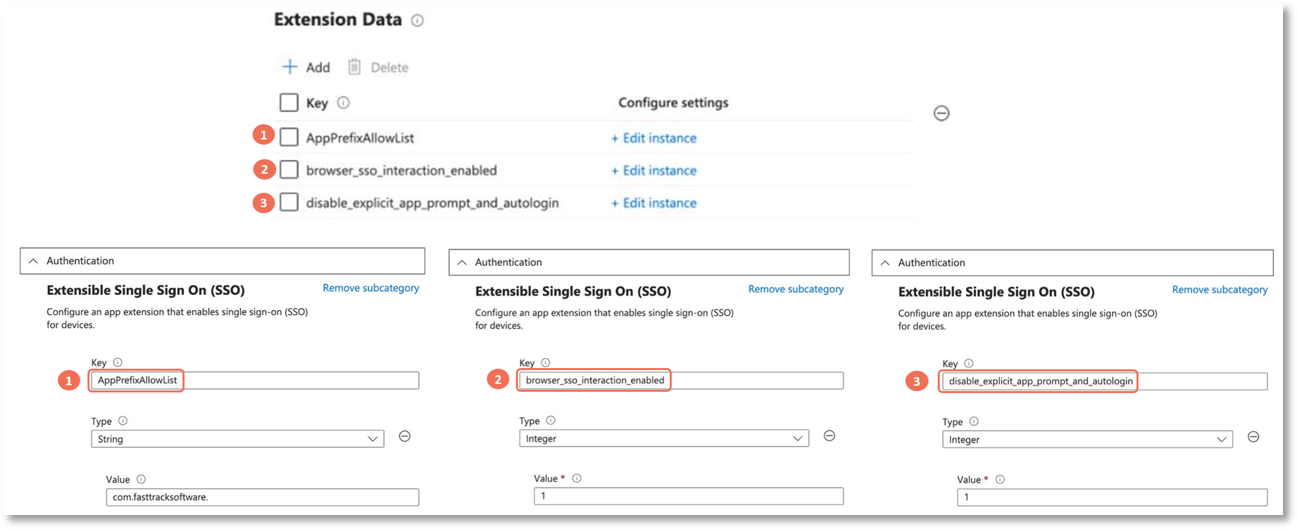
-
Click Review + save and confirm the Policy updated notification.
What each key does
The Keys, Types and Values entered are highlighted and explained below:
-
AppPrefixAllowList,string,com.fasttracksoftware.is the existing Admin By Request requirement and may already be present.The two Integer entries below are what unlock YubiKey/smartcard authentication in the Admin By Request MFA prompt on macOS.
-
browser_sso_interaction_enabled,integer,1lets the Entra browser SSO plug-in handle browser-based authentication challenges. This is the channel that presents YubiKey/smartcard as an MFA option on macOS (the option Windows gets without configuration), and it is also what transmits operating system information to Entra ID so that Conditional Access policies restricting login by operating system work correctly for MFA logins from macOS. Microsoft notes this key is enabled by default and is required for Conditional Access and MFA compatibility. -
disable_explicit_app_prompt_and_autologin,integer,1suppresses the explicit Microsoft sign-in prompt in favour of the cached PSSO identity, smoothing the MFA flow. (Microsoft's default for this key is 0; set it to 1 here.)
Other Platform SSO settings (do not modify)
For reference, the following Platform SSO settings are already in place in a standard Admin By Request + Entra ID PSSO deployment. Do not change these as part of this configuration.
|
Setting |
Value |
|---|---|
|
Extension Identifier |
com.microsoft.CompanyPortalMac.ssoextension |
|
Authentication Method |
UserSecureEnclaveKey |
|
Network Policy |
AttemptAuthentication |
|
Account Name |
preferred_username |
|
Full Name |
name |
|
Use Shared Device Keys |
Enabled |
|
Registration Token |
{{DEVICEREGISTRATION}} |
|
Screen Locked Behavior |
Do Not Handle |
|
Team Identifier |
UBF8T346G9 |
|
Type |
Redirect |
|
URLs |
https://login.microsoftonline.com, https://login.microsoft.com, https://sts.windows.net |
What this means for IT Admins
If macOS users need a YubiKey or smartcard as an option in the Admin By Request MFA prompt, deploying the agent alone is not enough. The presence of the option depends on the Platform SSO profile, not on Admin By Request settings. Add the two Extension Data keys above to the existing Platform SSO profile, and the option becomes available in the MFA prompt.
Refer to document Configuring Platform SSO for macOS for more information.
Example 1
Presenting a YubiKey in the macOS MFA prompt.
Scenario
A user has a YubiKey configured as an authentication method. On Windows it appears in the Admin By Request MFA prompt, but on their Mac it does not.
Behavior
-
On Windows, the YubiKey option is presented automatically with no extra configuration.
-
On macOS, the option only appears once the Platform SSO profile carries browser_sso_interaction_enabled=1 and disable_explicit_app_prompt_and_autologin=1 in Extension Data.
-
Platform SSO must be in use. Without it, this configuration path does not apply and YubiKey-in-MFA on macOS is not confirmed to be achievable.
IT Admin Guidance
Add the two Extension Data keys to the existing Platform SSO profile, save, and confirm the policy update. Because the Smart card PSSO method requires macOS 14 or later and configured Entra CBA, verify both before expecting the option to appear.
Example 2
MFA logins blocked by an operating-system Conditional Access policy.
Scenario
A Conditional Access policy only allows logins from specific operating systems. MFA logins from macOS fail because the operating system is not reported to Entra ID.
Behavior
-
Operating system information is not natively transmitted to Entra ID during MFA logins.
-
Enabling browser_sso_interaction_enabled in the Platform SSO profile makes that information available, so the Conditional Access policy evaluates correctly for MFA logins from macOS.
IT Admin Guidance
The same Extension Data change that unlocks YubiKey/smartcard auth also addresses this Conditional Access case. Confirm browser_sso_interaction_enabled is set to 1 in the Platform SSO profile.
General Rule
When enabling YubiKey or smartcard authentication for the Admin By Request MFA prompt:
-
On Windows it works without configuration.
-
On macOS it depends on the Platform SSO profile, not on Admin By Request settings.
-
Solve it by adding the Extension Data keys to the existing Platform SSO profile, and confirm that macOS version and CBA prerequisites are met.