Vulnerability Mitigation Guide
Internal Reference: ABR-WIN-26-01
This mitigation guide relates to a possible process spoofing vulnerability in the Admin By Request Windows driver.
Action Required
This vulnerability affects the Admin By Request driver component only. To remediate the issue, please choose one of the following options based on your environment and operational requirements.
Recommended Remediation Options
Option 1: Enable automatic update to version 8.7
In the Admin By Request portal:
-
Go to Settings > Tenant Settings > Auto-Update > WINDOWS WORKSTATION.
-
Enable Auto-update over the internet.
Once enabled, affected endpoints will be updated to version 8.7, which includes the corrected driver.
Option 2: Upgrade endpoints to version 8.7
Update affected endpoints directly to Admin By Request version 8.7.
Version 8.7 includes the updated driver and fully addresses this vulnerability.
Alternative Mitigation Options
If upgrading to version 8.7 is not currently possible, the following alternatives are available:
Option 3: Change UAC setting to Authenticate
In the Admin By Request portal:
-
Go to Endpoint Privilege Management > Settings > Windows Settings > Endpoint > UAC.
-
Change the setting from "Confirm" or "Multi-factor Authentication" to Authenticate.
This configuration uses the standard Windows UAC method instead of the Admin By Request driver. As a result, end users will be required to enter credentials when elevating. This can be used as a temporary mitigation.
Option 4: Re-download and reinstall your current version
Re-download the version you are currently using.
In the Admin By Request portal:
-
Go to Download.
-
Click the second word here (as in "here for previous versions"):
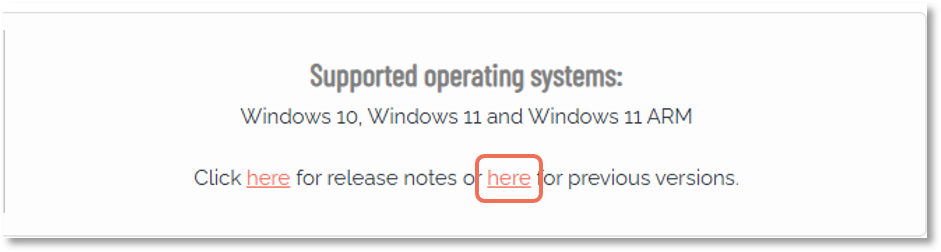
-
Download your current version from the list.
For example, if you are using version 8.5, download version 8.5 from the archive, uninstall the existing installation, and then reinstall using the newly downloaded package.
After reinstalling, you can verify that the driver has been updated by using the driver update utility described below.
Option 5: Update the driver only
You may also update the driver independently, without reinstalling Admin By Request. See Driver Update Program
Option 6: Manually update driver file
Manually push out an updated driver file to affected endpoints. In order to utilize this option, please reach out to our technical support team.
Driver Update Program
The vulnerability has been addressed in version 8.7 through an updated driver. For versions prior to 8.7, the driver can be updated separately by replacing the driver file only. This can be done without reinstalling Admin By Request and without impacting normal product operation.
To support this process, Admin By Request provides a driver update utility that:
-
detects the correct platform-specific driver
-
replaces the existing vulnerable driver
-
works across both x64 and ARM systems
This utility can be deployed across endpoints, and your MDM or vulnerability management tooling can be used to verify remediation status.
You can download the driver update utility here:
https://www.adminbyrequest.com/documents/ABRDriverUpdate.zip
On systems already running version 8.7 or later, the utility has no effect. It is safe to run repeatedly if needed.
Command line usage
To check whether the driver is updated:
ABRDriverUpdate.exe /P Action=CheckTo update the driver:
ABRDriverUpdate.exe /P Action=PatchRegistry verification
In both cases, update status can be verified using the following registry key:
HKEY_LOCAL_MACHINE\SOFTWARE\FastTrack Software\Admin By Request\DriverUpdatedIf the driver has been successfully updated:
-
DriverUpdated (REG_DWORD) will be set to 1
-
DriverPatchTime will contain the time of the update
If the utility is run again after the driver has already been updated, DriverPatchTime is not modified.
About the Patch Program
The patch program was built using FastTrack Automation Studio, available at:
https://www.fasttrackscript.com
FastTrack Automation Studio is developed by Admin By Request and can create self-contained executables from scripts. It is also suitable for building custom tray tools.
You can download the script source and patch utility here:
https://www.adminbyrequest.com/documents/ABRDriverUpdateScript.zip
This is provided in case you want to review or modify the script.
To build a self-contained executable in the script editor:
-
Select Exe File > Advanced Exe File Compilation
-
Choose Include files from my project… and include both driver files:
-
x64 driver
-
ARM driver
-