Using the Report
Overview
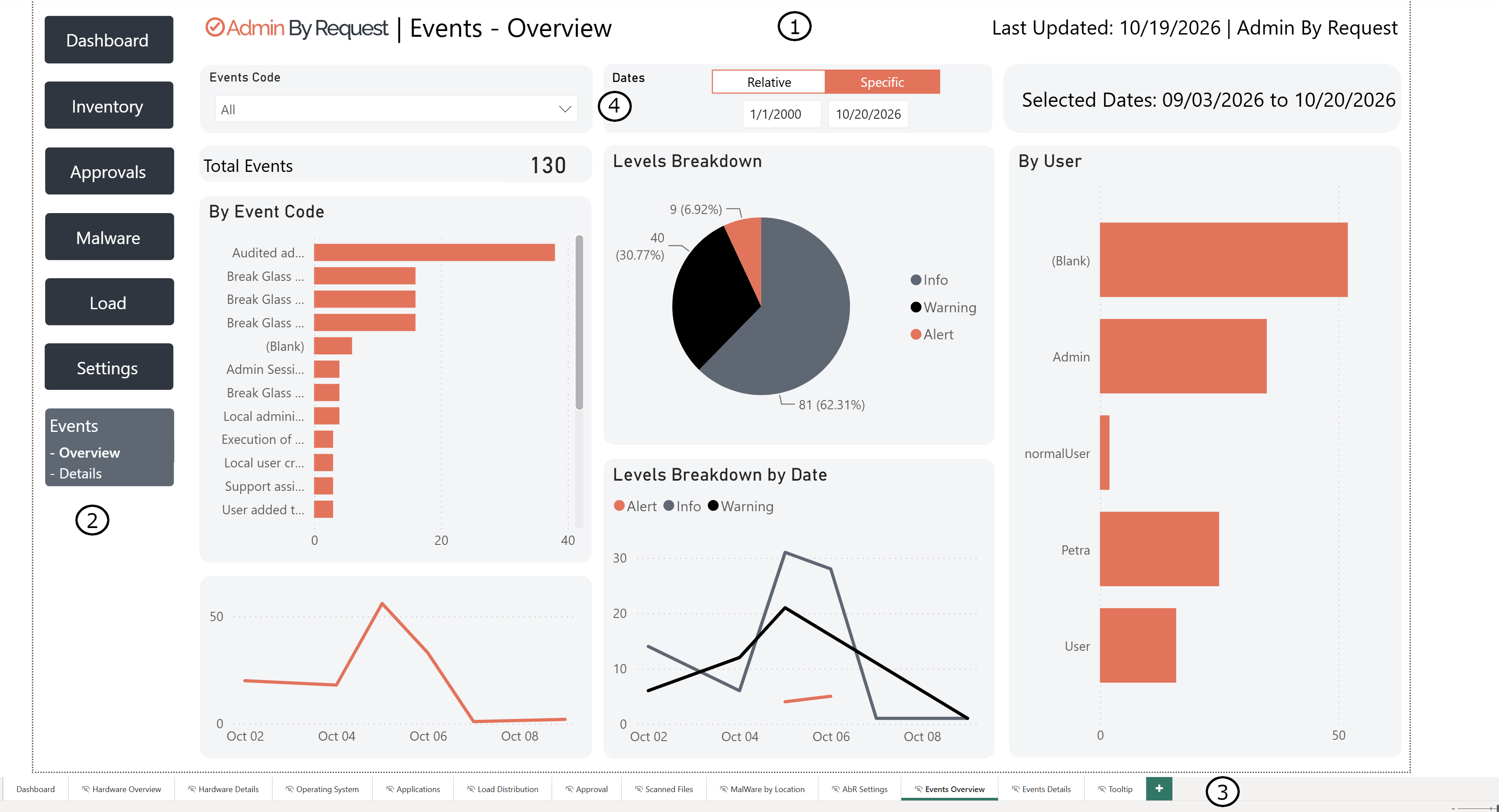
The following image provides an overview of the report and its components.
-
Header
-
Navigation
-
Report pages
-
Filters
Header
The read-only text to the right of the Admin By Request logo indicates the current page name.
Your company name and a Last Updated timestamp appear in the top right corner of every page. If the Last Updated date is not current, the scheduled refresh has not run yet, or the dataset requires a manual refresh.
Navigation
Use the left-hand menu to navigate between pages of the report.
The Inventory and Malware menu items have expandable sub-menus and open on the first page in their list.
Report Pages
The Admin By Request template ships with 13 report tabs organized into seven navigation groups. The left-hand menu shows the group names; the tabs at the bottom of the report window show the individual page names.
Note: Three of the left-hand menu labels differ slightly from the underlying tab names. "Approvals" in the menu opens the Approval page; "Load" opens Load Distribution; "Settings" opens AbR Settings.
 Dashboard
An overview of recent activity across the tenant: request volumes, elevated process counts, malware detection summaries, and approval status breakdowns. This is the starting point for a quick picture of recent privilege activity. All visuals respond to the date, type, user, and Sub-Setting filters.
Inventory (sub-pages: Hardware Overview, Hardware Details, Operating System, Applications)
Hardware state across the managed fleet broken into four pages: CPU speeds and hardware specs (Hardware Overview), per-device hardware detail (Hardware Details), OS version and build distribution (Operating System), and installed application counts (Applications). The Inventory menu item expands to show all four sub-pages.
Note: Inventory shows hardware data only. Software inventory (installed applications per device) requires an additional parameter (wantsoftware=1) on the Inventory API calls that is not included in the standard template. See Troubleshooting for details.
Approval
A detailed view of approval activity: pre-approvals (rules that auto-elevate without prompting), admin approvals (manual decisions), auto-approvals (machine learning or AI), and denied requests. Also includes a chart showing the average time between a request being submitted and a decision being made. This is useful for demonstrating to auditors that requests are reviewed promptly.
Malware (sub-pages: Scanned Files, MalWare by Location)
Two sub-pages covering malware detection events: Scanned Files lists detected malicious files with file name, scan result, detection engines that flagged it, and timestamp; MalWare by Location shows a geographic map of detection events based on device location.
Note: The geographic map on the MalWare by Location page has two separate requirements: (1) location data must be enabled in the Admin By Request portal ("Location information is not available. It can be activated in the AdminByRequest Portal"), and (2) map and filled map visuals must be enabled by a Power BI tenant administrator in the Power BI admin portal. If the map shows the error "To fix this, ask your tenant admin to enable map and filled map visuals in the admin portal" (underlying error: MapVisualNotEnabled), this is a Power BI tenant-level setting outside of Admin By Request's control.
Load Distribution
Usage pattern analysis: elevation requests by day of week, by hour of day, and by user. Answers operational questions like, "Do we need approval coverage on Saturday mornings?" and, "Which users generate the most elevation requests?"
AbR Settings
A breakdown of which sub-settings are being applied across the tenant, by user, application, and setting type. The Type filter supports multiple selections. Useful for confirming that policy is being applied as intended and identifying users or devices falling through to global settings when they should be matched by a sub-setting.
Events (sub-pages: Events Overview, Events Details)
System-level activity log split across two pages. Events Overview shows total event counts broken down by event code (installation, uninstall, PIN change, diagnostics, password change, support assist, and others), severity levels (Info, Warning, Alert), and by user. Events Details provides the full record-level event list. Added in version 2.0 of the template, this section gives security teams visibility into changes to Admin By Request's operational state and privileged account activity.
Filtering Data
Most report pages contain a set of interactive filters. Changing any filter updates all visuals on the page simultaneously.
-
Date selector: Switch between Relative dates (for example, "last 30 days") and a Specific date range. The current date range is shown in the read-only Selected Dates field.
-
Sub-Settings filter: A drop-down listing all sub-settings configured in your Admin By Request portal. Multiple selections are supported.
-
Type filter: Buttons or drop-down menus to filter by elevation type (Run As Admin, Admin Session) or request outcome (approved, denied, auto-approved).
Clicking a data point in one visual automatically cross-filters all other visuals on the page to show related data. For example, clicking a specific user in one chart updates the application chart to show only that user's elevation history.
Wherever (Blank) appears, it indicates that no data exists for that option in the current date range.