Break Glass / LAPS
What is it?
Break Glass Account is Admin By Request's (ABR's) answer to the last-resort access problem: what do you do when the normal paths to administrator access on an endpoint are unavailable? The domain trust relationship is broken. The ABR agent itself has failed. There is no one with existing credentials who can log in. An IT contractor needs to service a machine without being given domain-wide permissions.
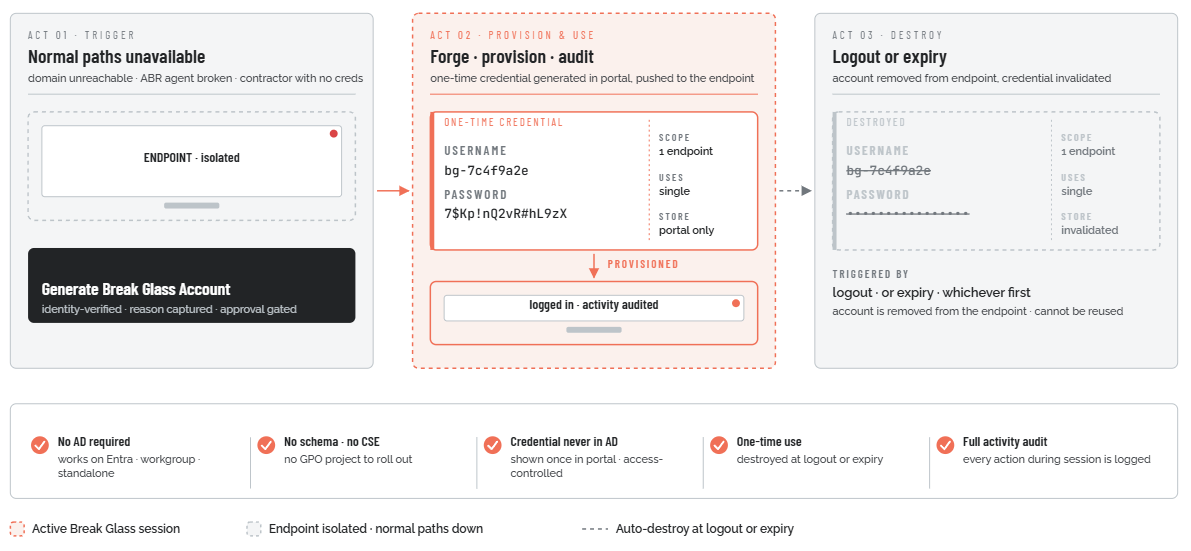
In these situations, organizations have historically fallen back on Microsoft's Local Administrator Password Solution (LAPS) or a shared local admin account. Both carry substantial security risk. Break Glass Account replaces them with a just-in-time model: a one-time-use local administrator account that is generated from the ABR portal on demand, provisioned directly to the target endpoint, used for the task at hand, and then permanently destroyed - either when the user logs out or when the configured expiry time is reached, whichever comes first.
The account is temporary, scoped to one machine, non-reusable, and fully audited. All privileged activity carried out during the Break Glass session is logged to the ABR Auditlog. The account name and password are auto-generated, random, and complex - they are never stored in Active Directory, never disclosed via plain text, and cannot be reused after the session ends.
What problem does it solve?
Every endpoint managed by ABR has its local admin rights removed from standard users. That is the whole point: users cannot elevate applications without going through ABR's controlled workflow. But this model creates a secondary risk: if the normal elevation paths are unavailable - because the domain is unreachable, because ABR itself has broken, or because the person who needs access has no domain credentials at all - there is no safe fallback.
The traditional answer is one of two bad options:
-
Leaving the built-in local Administrator account enabled. This gives technicians a recovery path, but the account is permanent, its username is well-known (`Administrator`), and its password is either never changed (a standing vulnerability) or rotated through a manual process that is hard to scale. Credentials are typically documented in a shared location - a password manager, a spreadsheet, a sticky note - where they can be discovered, exfiltrated, or misused.
-
Microsoft LAPS. LAPS rotates the local admin password automatically and stores it in Active Directory (AD). This is substantially better than a static password, but it has some gaps:
-
The password is stored in AD alongside the computer object. By default it is readable in plain text by anyone who can query that attribute, which in many environments includes far more people than it should.
-
LAPS requires AD. It does not work on Azure AD-joined, Entra ID-joined, or standalone (workgroup) machines.
-
Setup requires extending the AD schema, deploying a Client-Side Extension to every endpoint, configuring Group Policy, and managing access permissions. This is a non-trivial project.
-
LAPS provides no built-in audit trail of what was actually done during an elevated session. There is a record of who retrieved the password, but not what they did with it.
-
There is no one-time-use mechanism: once a LAPS password is retrieved, it can be used again until the next rotation.
-
Break Glass Account addresses all of these gaps. It works with or without AD. It requires no schema changes, no CSE deployment, and no Group Policy. Credentials are shown once in the ABR portal and stored there under portal access controls - never in AD. The account is one-time-use: it is destroyed on logout. And all elevated activity during the session is captured in the ABR Auditlog.
Forged on demand, destroyed on use.
A one-time-use local administrator account, generated in the ABR portal, provisioned to one endpoint, and permanently torn down at logout or expiry.