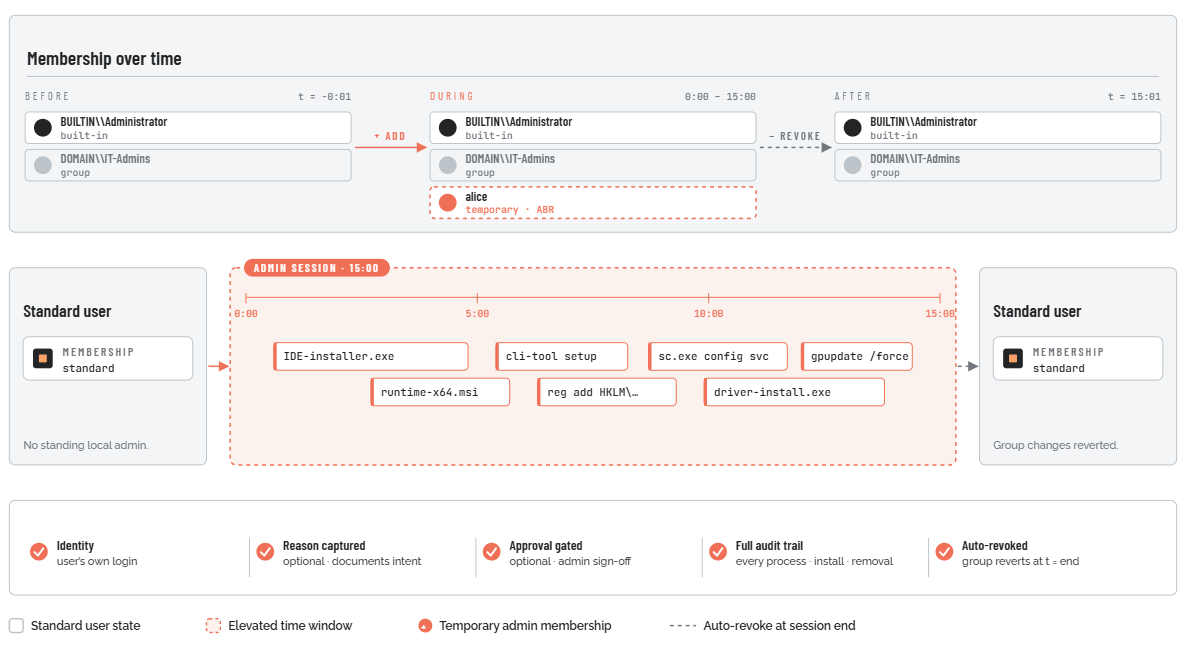
Admin Session
What is it?
Admin Session (also known as Session Elevation or Administrator Access) is one of three controlled elevation paths in Admin By Request (ABR), and the broadest of the three. When a standard user needs to perform a set of administrative tasks - installing a development environment, configuring drivers, running multiple tools in sequence, or working with software that requires admin rights throughout its operation - Admin Session gives them full local administrator access for a configurable time window. The default window is 15 minutes.
Unlike Run As Admin, which elevates a single process in isolation while the user's session token stays standard, Admin Session temporarily makes the user a member of the local Administrators group. Every process launched during the session runs under an elevated identity. When the session ends, the user is removed from that group and ABR restores the system to its pre-session state - including reverting any changes made to the local admin group during the session, so the elevation cannot be used to create persistent back-door access.
All of this is logged, audited, and - if configured - requires a written reason and an explicit approval before it begins.
Admin Session is available on Windows, macOS, and Linux. The mechanism for starting and ending a session differs slightly by platform, but the core model is the same: temporary, scoped, audited elevation with automatic cleanup.
What problem does it solve?
Some elevation tasks cannot be handled by Run As Admin because ABR's process-level interception only works when a specific application triggers a UAC prompt. Several categories of real-world work fall outside that model:
-
Multi-step administrative work. Installing a full software development environment might involve an IDE installer, a runtime installer, a CLI tool, and several configuration utilities - each needing elevation. Running them through Run As Admin individually would require separate approvals for each.
-
Applications that do not trigger UAC. Some software checks for admin group membership at runtime rather than requesting UAC elevation. If the user is not in the local Administrators group, the application silently fails or reports insufficient privileges - and there is no UAC event for ABR to intercept.
-
Open-ended IT troubleshooting. A support technician investigating a problem may not know in advance which tools they will need. Locking them to one process at a time with individual approval requests is impractical.
-
Developer workflows. Developers frequently need admin rights throughout a working session to run build scripts, modify registry keys, manage services, and perform other tasks that individually would each require their own elevation.
The traditional answer to this problem is one of two bad options:
-
Give the user standing local admin rights. Convenient, but the user is permanently elevated. Any process that runs under their account - including malware, compromised browser tabs, or accidental script execution - runs with admin privileges without any check or audit.
-
Use LAPS or share a local admin account. Temporary, but requires disclosing credentials. The user has unrestricted access with no audit of what was done or why, and the credential itself is a secret that can be captured.
Admin Session avoids both problems. The user gets temporary admin access through a workflow that requires their own identity (not a shared credential), collects a written reason for the elevation, optionally gates on an admin approval, limits the duration to what was actually needed, and produces a full audit trail of every process run and every piece of software installed or removed during the session. When the session ends, the user's elevated membership is revoked automatically - they cannot extend it, and they cannot exploit the session to leave behind persistent admin access.
A bounded window of full local admin
For the duration of the window, the user is added to the local Administrators group. When it ends, ABR removes them and reverts any group changes made during the session.